Are you planning to become a React Developer in 2025? That’s a smart move!
React is one of the most in-demand front-end technologies in the job market today. Whether you're a student, freelancer, or aspiring web developer, learning React can open doors to high-paying jobs and freelance opportunities.
In this article, you’ll learn:
-
What is React?
Why become a React Developer?
What should you learn before React?
-
Step-by-step React roadmap (with projects)
-
Free resources to learn React
-
How much can React developers earn?
-
Extra tools like Tailwind CSS, Redux, Firebase
-
Job preparation tips

What is React?
React is a free, open-source JavaScript library used to build fast and interactive user interfaces (UIs) for websites and mobile apps.
It was created by Facebook and is now used by big companies like:
-
Meta (Facebook, Instagram)
-
Netflix
-
Airbnb
-
Uber
-
Flipkart
React helps developers build dynamic websites that update without reloading the page. It's super powerful for creating Single Page Applications (SPA).
Why Become a React Developer?
1. High Demand
React is the most in-demand frontend skill in 2025.
According to job data, 47%+ of tech job postings now ask for React experience. Whether it’s startups or big companies like Amazon, Flipkart, or TCS – everyone wants React developers.
2. High Salary
React developers earn some of the highest salaries in frontend development.
In India, salaries start at ₹4–7 LPA for freshers and can go up to ₹30+ LPA with experience.
Globally, React devs earn $80k–$150k per year depending on location and experience.
3. Build for Web, Mobile & Desktop
React is not just for websites.
You can use:
-
ReactJS for building web applications
-
React Native for mobile apps (Android + iOS)
-
Electron + React for desktop apps (like VS Code)
This makes React a flexible tool for all types of software development.
4. Huge Community & Ecosystem
React has a massive community of developers worldwide.
You’ll find:
-
Tons of tutorials, YouTube videos, courses
-
Thousands of open-source components and libraries
-
Quick help on forums like StackOverflow and Reddit
The bigger the community, the faster you grow!
5. Remote & Freelance Friendly
React developers have plenty of remote and freelance opportunities.
Popular freelance websites like:
-
Upwork
-
Fiverr
-
Freelancer
-
Toptal
all have high demand for React developers.
Prerequisites Before Learning React
Before you jump into React, you must know the basics of web development:
1. HTML – Structure of websites
-
Learn about elements, headings, forms, buttons, images, etc.
2. CSS – Styling websites
-
Learn Flexbox, Grid, margins, paddings, fonts, responsiveness.
3. JavaScript – Logic behind the site
-
ES6+, Arrays, Functions, Loops, DOM
How to Install React
You can start learning React in two ways:
1. Local Setup (Using create-react-app)
You need Node.js installed on your system.
👉 Full Setup Guide: React Installation Guide
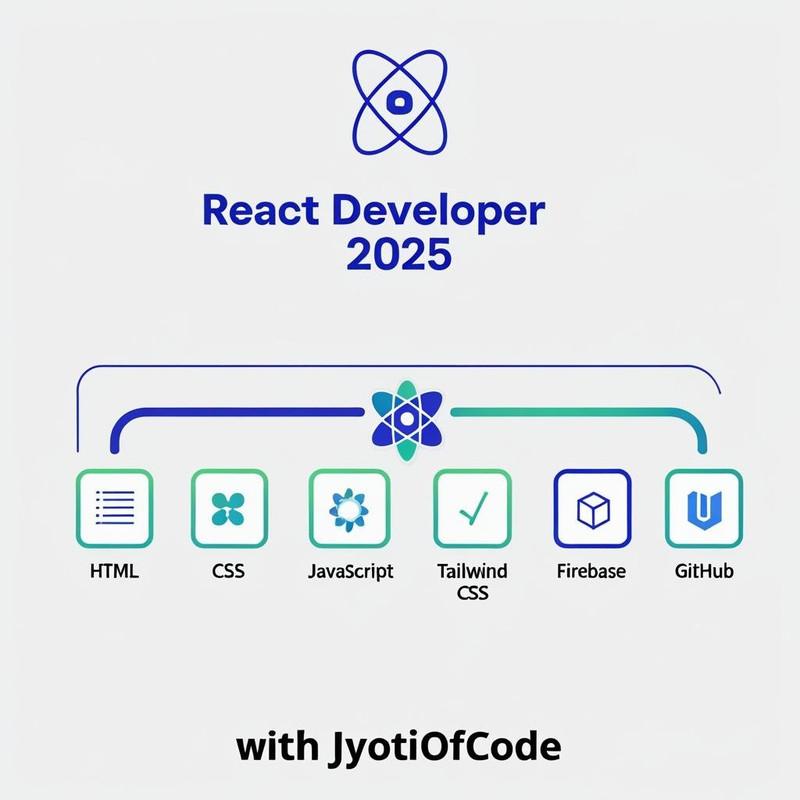
React Developer Roadmap – Step-by-Step
Step 1: React Basics
-
What is JSX?
-
Functional vs Class Components
-
Props & State
-
Handling Events
Step 2: Advanced React Concepts
Once you're comfortable with the basics, go deeper into advanced topics. These will help you build faster, smarter, and more scalable apps.
React Hooks (Deep Dive)
React hooks are functions that give you extra powers in functional components.
-
useState: Create and update state -
useEffect: Run code after render (API calls, timers, etc.) -
useContext: Share data across components without props -
useReducer: Advanced state logic (like Redux-lite) -
Custom Hooks: Reuse logic across components
Step 3: Styling in React
-
CSS Modules
-
Tailwind CSS
-
Styled Components
Tailwind CSS Example:
👉 Tailwind Docs: Tailwind with React
Step 4: State Management
-
Context API
-
Redux + Redux Toolkit
Step 5: API Integration
-
Use
fetch()oraxiosto get API data -
Display data using
useEffect()
Step 6: Build React Projects
Start with small → then build big projects
Small Projects:
-
Counter App
-
To-Do App
-
Calculator
Medium Projects:
-
Weather App using API
-
Portfolio Website
-
Blog App using Firebase
Big Projects:
-
E-commerce Website
-
Chat App using Firebase
-
Netflix Clone (UI Only)
👉 Upload on GitHub to showcase your work
Step 7: Deployment (Launch Your Projects)
-
Use Netlify or Vercel to host for free
-
Buy domain from Namecheap, GoDaddy
-
Connect with GitHub for auto-deploy
React Component – A Quick Guide
React is all about components. A component is a reusable UI block.
You can reuse <Header /> in multiple places. This is the real power of React.
React Developer Toolkit (2025)
-
VS Code + React Extensions (ES7 Snippets, Prettier)
-
Chrome DevTools + React Developer Tools
-
Postman – Test APIs
-
Figma – For UI design
Core React Concepts – Explained Simply
To build powerful apps with React, you must first understand its core building blocks.
Here’s a quick overview of essential React concepts:
| Concept | Description (in Simple Words) |
|---|---|
| Components | Think of them like reusable blocks – header, footer, buttons, etc. |
| JSX | A mix of HTML + JavaScript – used to design UI in React. |
| Props | Data passed into a component like parameters in a function. |
| State | Data that changes inside a component (e.g. counter value). |
| Event Handling | Responding to user actions (click, typing, etc.). |
| Conditional Rendering | Show/hide elements based on conditions (e.g. logged in or not). |
| Lists & Keys | Displaying multiple items like tasks, users, posts with unique keys. |
| useState / useEffect | Hooks to manage state and handle side effects like API calls. |
| Forms | Collecting input using form fields and managing form data. |
| Routing | Moving between pages using React Router (e.g. Home → About). |
| Context API | Sharing data (like theme or user) between multiple components. |
Job Preparation for React Developers
To get hired, you need:
-
Strong JavaScript + React Concepts
-
3–5 Good Projects (GitHub + Deployed)
-
Resume + LinkedIn Profile
-
Practice Questions
Interview Resources:
-
Leetcode (JavaScript problems)
-
React Interview Questions
-
Frontend Mentor for design challenges
How Much Can You Earn?
In India:
-
Fresher: ₹4–7 LPA
-
Mid-level: ₹8–15 LPA
-
Expert: ₹20–30+ LPA
Freelancing:
-
$15–$50 per hour depending on project and skills
💡 Start building your portfolio early and apply on platforms like Upwork, Fiverr, Freelancer, Internshala, LinkedIn.
React & Frontend Developer Salary in 2025
If you're planning to become a React Developer or Frontend Engineer, you’ll be happy to know that React developers are among the highest-paid tech professionals in 2025.
Here’s a quick salary breakdown:
| Role | Average Annual Salary (USD) | Range (USD) |
|---|---|---|
| React Developer | $70,000 – $140,000 | $40,000 – $200,000 |
| Frontend Developer | $70,000 – $154,000 | $70,000 – $240,000 |
Why so high?
React developers are paid more because:
-
React is in high demand globally
-
It powers complex modern web apps
-
React works with mobile (React Native) and desktop apps (Electron)
-
Companies want skilled devs who can build fast, interactive UIs
What Affects Salary?
Your salary depends on:
-
Location (USA, UK, India, etc.)
-
Experience level (fresher or senior dev)
-
Company type (startup or MNC)
-
Skills (React + Redux, Tailwind, Firebase, etc.)
What to Learn After React?
Once you're confident in React, you can learn:
-
TypeScript – Type-safe JavaScript
-
Next.js – React framework for SEO and SSR
-
Firebase – Realtime database + authentication
-
Framer Motion – Animations
-
Testing (Jest, React Testing Library)
Final Words: Start Your React Journey Today!
React is the future of frontend development. With so many free resources, now is the best time to start.
Follow this roadmap:
-
Learn HTML, CSS, JS
-
Learn React step by step
-
Build projects (small to big)
-
Host them online
-
Apply for jobs or freelance gigs
💬 Have questions? Drop them in the comments. Let’s learn together!
Conclusion: Start Your React Developer Journey Today with JyotiOfCode
React is not just a trend — it’s the future of frontend development. Whether you're a student aiming for your first internship, a freelancer looking for better clients, or someone switching careers — React gives you the power to build modern, fast, and responsive web apps.
At JyotiOfCode, we believe in learning with real-world projects, step-by-step guidance, and free resources that actually help.
Your next step:
-
Master HTML, CSS, JavaScript
-
Learn React (follow this roadmap!)
-
Build projects → Host them → Share on GitHub
-
Apply confidently for jobs or freelance gigs
❓ Frequently Asked Questions (FAQs)
1. Is React hard to learn for beginners?
React is beginner-friendly if you already know the basics of HTML, CSS, and JavaScript. Start slow with small projects and grow from there.
2. How long does it take to learn React?
On average, 1–2 months of consistent learning (1-2 hours daily) is enough to build small to mid-level React projects. Mastery takes longer as you explore advanced topics.
3. Can I learn React without JavaScript?
No. JavaScript is the foundation of React. You must be comfortable with variables, functions, arrays, loops, and ES6+ features before learning React.
4. Is React still worth learning in 2025?
Absolutely! React continues to dominate the job market in 2025, with massive demand for skilled developers across startups, MNCs, and freelance platforms.
5. What are the top 3 projects I should build in React?
-
To-Do App – Covers state & components
-
Weather App (with API) – Introduces fetch and useEffect
-
Portfolio Website – Showcases your profile and projects
6. What comes after React?
Once you’re good with React, level up with:
-
Next.js for SEO-friendly apps
-
Firebase for backend integration
-
TypeScript for type safety
-
Redux/Context API for state management
7. Where can I find free React tutorials?
Right here on JyotiOfCode. Check out: